Costs are scattered
Monthly and annual plans make it hard to understand your real monthly and yearly spend.
SubTrack
Track services, costs, and upcoming renewals in one place. Use reminders, calendar views, and analytics to review recurring expenses before they pile up.
No bank connection is required. SubTrack does not store card numbers.
Common issues
Video, music, work tools, cloud storage. As useful services increase, the total monthly picture gets harder to see.
Monthly and annual plans make it hard to understand your real monthly and yearly spend.
Free trials and annual renewals can turn into charges for services you no longer use.
Each service may feel inexpensive, but the total can become a recurring cost worth reviewing.
How it works
Track only the subscriptions you care about, without connecting a bank or card account.
Enter the service name, amount, billing cycle, and first payment date.
Choose how many days before billing to be notified by app notification, email, or both.
Check upcoming charges on the calendar and review monthly or yearly totals.
Features
Lists, renewal dates, reminders, analytics, export, and PWA access are grouped into one workflow.
Keep active subscriptions together
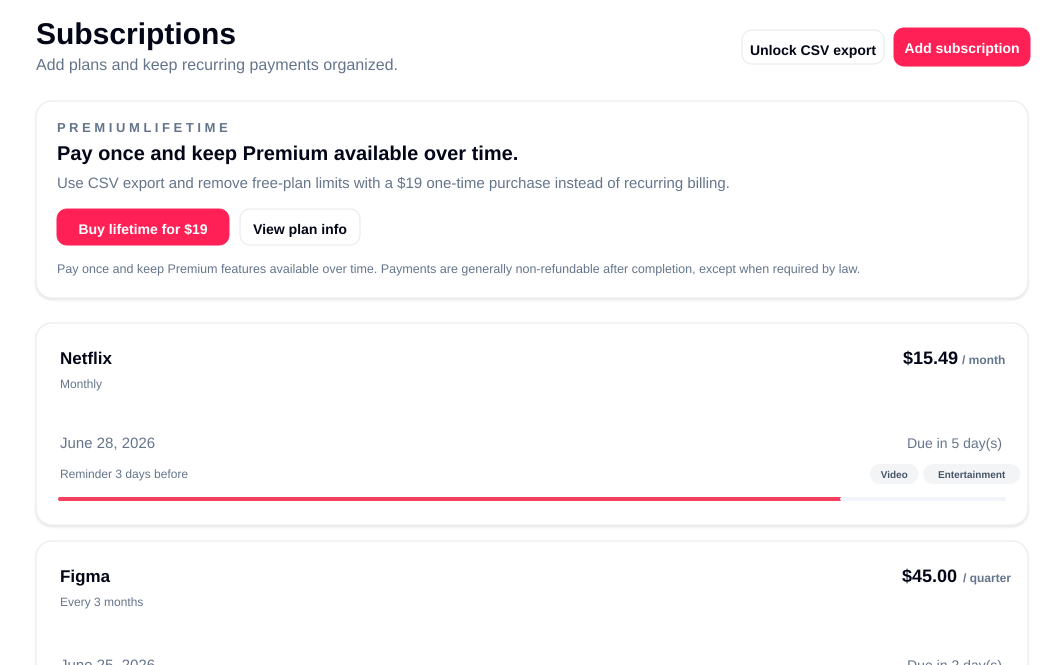
View amount, billing cycle, category, and next billing date in one list.
See upcoming charges on a calendar
Review what will be charged this month and when it happens.
Reduce missed billing dates
Receive app notifications, email, or both based on your settings.
Visualize monthly and yearly costs
Check totals and breakdowns to find services worth reviewing.
Export data when needed
CSV export and free-plan limit removal are available on Premium.
Open from your home screen
Add SubTrack to your phone home screen and launch it like an app.
Pricing
Begin with the free limit, then upgrade when you need more entries or CSV export.
For getting started
Track up to 5 subscriptions.
For ongoing management
Remove entry limits and use CSV export and import.
For avoiding another monthly bill
Use Premium-level features with a one-time purchase.
FAQ
Review the free limit, reminders, card handling, home-screen install, and paid-plan management.
View all FAQYou can add up to 5 subscriptions. Premium is required for the sixth and later.
You can choose app notifications, email, or both.
No. Card details are handled by the payment provider, not by SubTrack.
Yes. Supported browsers let you add SubTrack to your home screen and open it like an app.
After logging in, open the billing management page from settings.
Continue with Google and start by adding the five subscriptions you use most often.